ip
Husky
About
Husky is a chat-bot style task management app that works over the CLI. It is meant for users to keep track of their daily tasks comprehensively.
Download
You can download husky here.
Features
- Add tasks based on type - ToDo, Deadline or Event
- Automatically saves the task list
- Mark / Unmark tasks based on completion
- deletes a specific task
- Find Tasks based on a keyword
- Automatically sorts the tasks based on chronological order
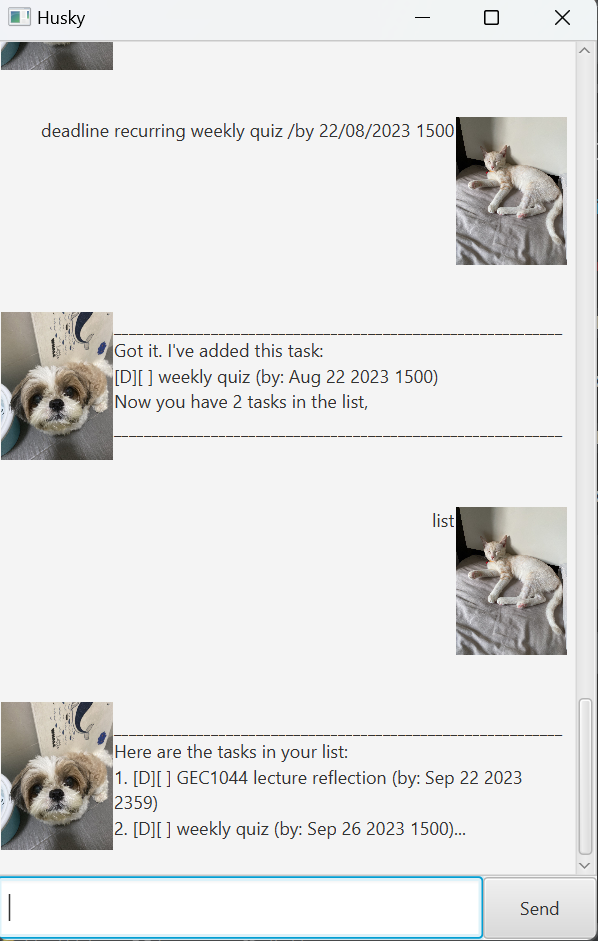
- Able to add a recurring task that repeats weekly on the same day
Usage
todo - Adds tasks that are not chronologically sensitive
Adds a task of type todo to the list
Input format:
todo TASK
Example of usage:
todo check email
Expected output:
Got it. I've added this task:
[T][ ] check email
Now you have 1 task in the list
deadline - Add tasks that have a due date
Adds a task of type deadline to the list
Input format:
deadline TASK /by DD/MM/YYYY HHMM
Example of usage:
deadline GEC1044 lecture reflection /by 22/09/2023 2359
Expected output
Got it. I've added this task:
[D][ ] GEC1044 lecture reflection (by: Sep 22 2023 2359)
Now you have 1 task in the list
event - Add task that lasts a specific duration
Adds task of type event to the list
Input format:
event TASK /from DD/MM/YYYY HHMM /to HHMM
Example of usage:
event jamboree /from 22/09/2023 1830 /to 2100
Expected output:
Got it. I've added this task:
[E][ ] jamboree (from: Sep 22 2023 1830 to: 2100)
Now you have 1 task in the list
mark - marks the task as done
marks the i-th task in the list as done with ‘X’
Input format:
mark INDEX
Example of Usage:
mark 1
Expected output:
OK, I've marked this task as done:
[E][X] jamboree (from: 22 Sep 2023 1830 to: 2100)
unmark - Unmarks the task as undone
Unmarks the i-th task in the list as undone
Input format:
unmark INDEX
Example of Usage:
unmark 1
Expected output:
OK, I've marked this task as not done yet:
[E][ ] jamboree (from: Sep 22 2023 1830 to: 2100)
delete - Deletes the task from list
Deletes the i-th task in the list
Input format:
delete INDEX
Example of usage:
delete 1
Expected output:
Noted, I've remove this task:
[E][ ] jamboree (from Sep 22 2023 1830 to: 2100)
Now you have 0 task in the list
find - search for a list in the list
perform an exact search with a keyword given by the user
Input format:
find KEYWORD
Example of usage:
find reflection
Expected output:
Here are the matching tasks in your list:
1. [D][ ] GEC1044 lecture reflection (by: Sep 22 2023 2359)
list - lists all the tasks
Displays all the tasks in the list
Input format:
list
Example of usage:
list
Expected output:
Here are the tasks in your list:
1. [D][ ] GEC1044 lecture reflection (by: Sep 22 2023 2359)
2. [T][ ] check email
TYPE recurring - Add a recurring task
Adds a weekly recurring task of type deadline or event
Input format:
TYPE recurring TASK /by DD/MM/YYYY 1500
Example of usage:
deadline recurring weekly quiz /by 22/08/2023 1500
list
Expected output:
Got it. I've added this task:
[D][ ] weekly quiz (by: Aug 22 2023 1500)
Now you have 3 tasks in the list
Here are the tasks in your list:
1. [D][ ] GEC1044 lecture reflection (by: Sep 22 2023 2359)
2. [D][ ] weekly quiz (by: Sep 26 2023 1500)
bye - Exits the application
terminate the application and saves the list
Input format:
bye
Example of usage:
bye
Expected output:
Bye. Hope to see you again soon!